Posts

Showing posts with the label After Effects

My Tahu Tribute Video was Featured in This Year's 810NICLE Day!

Wow! I've been a bit busy as of late (hence my posting over a month after the event in question), but it's an honor to have my Tahu 90th Anniversary recreation in the formal 810NICLE Day stream! (For the uninitiated, this is completely fan-run, currently two-day stream, and features interviews with official BIONICLE staff, various fan works of the last year, and more.) The stream is currently down, but the full contents are available as a playlist here !

Star Wars Custom Blu-ray Cover: 2011-Style Sequel Trilogy

Image
 For some reason or another, I've put After Effects on my list of favorite photo editors. It isn't meant to be used as one at all, but I find its style of masking, color correction, and effects rather useful and pleasant to work with. In one instance of this, I decided to use After Effects for a Sequel Trilogy cover that mimics the stylized look of 2011’s trilogy releases: I fit the printed cover (one draft, anyway) and the sequel disks into a spare 2013 6-disc Prequels case, which allowed me to have each two-disc Blu-ray set in one case, so the spine is a bit wider than the other two. There isn't a giant face on the front, as there is with the other two, but beyond that I feel like the official mural I used for the front cover aligns with the painted look of the other two pretty decently. Here's my latest version of the full image, complete with a couple of other changes for accuracy:  As the printed version shows, some space on either side will be cut off in the f...

Tahu 2001 Animation Recreation (90th Anniversary Form)

Image
One shot was never enough.  With real life kicking in and my specializing in a different field, I honestly thought most of Blender was behind me, outside the occasional test or minor project. However, this is probably my most advanced full-CG Blender project yet! I'm really grateful to learn that life doesn't have to put an end to projects like this. In any case, this was a full, multi-camera project rendered in Eevee (although the mask in the final shot was rendered in Cycles), and it used no small part of everything I'd learned (and some I hadn't yet): HDRIs, shape keys, multiple cameras, animated procedural texturing, and even gravity/collision physics. (I still don't dare attempt fluid simulation; the lava in the second-to-final shot used up to 6 shape keys to imitate both generic "waves" and its reaction to the falling rock.) In the meantime, I used After Effects for some minor compositing, sound, all of the final shot outside the mask itself, an...

New IB Epistemology Video, DaVinci Resolve, and The Adobe Post

Image
Hello all, Last October, my father (known to Zoom Times as the Grand Emperor of the Zoomlian Empire), a Theory of Knowledge teacher, learned that his school wanted a short video from each teacher in his program introducing prospective students to the program's various subjects. Having noticed that he has a video creator in the house and having a creative concept in mind, he approached me with an atypical script and asked about directing and editing the short film. As it turned out, I'd just recently acquired the video editor DaVinci Resolve and had been looking to test it out, and this helped me grab the basics of the program pretty quickly! This is mostly video editing (done completely in Resolve), although I did use After Effects for two shots, one compositing-focused and the other motion graphics-focused. I couldn't find any stock music that fit the tone my dad was looking for, but Lei Hart's "It's About Time" track worked perfectly, so I got permis...

Doctor Strange knows the BIONICLE Fan Experience

Image
There's a certain phenomenon BIONICLE fans know of, referred to as "the dream." When I first saw the teaser trailer for the second Doctor Strange installment, I knew what to do. To be honest, this is probably the first time I tried the After Effects rotoscoping tool and it actually turned out well. In the past (e.g. Clash of the Jedi ), the results of rotoscoping would be questionable, need a lot of cleanup, or both, which made me rely entirely on masking instead throughout the ABYDOS duology, but this time it worked out pretty painlessly. Anyway, I used rotoscoping for Strange himself and a mask for the ground; after that, it was mostly a matter of finding as many full shelf images as I could. I stuck them in a pre-comp, then moved it to track with Strange's vision and color graded it to fit in a little better, throwing a CC Snowfall on and tweaking it to match the ashes. 

Heracles Engineering Robotics Showcase: DANT-1C

Image
Exciting news: building on my promo work for Robotrio, we now have a showcase video for Dant! I worked on the writing, editing, and modeling/animation for this project, alongside some minor compositing/motion graphics and material work (although the more complex motion graphics were taken from stock video). I'd especially like to thank HahliNuva of Red Star Games for the cell shading used starting from the 30-second mark--which also marks the first time I've collaborated with someone else on a 3D project.   This is also the first time I've taken a hard look into node-based procedural textures, using them for the wood in Dant's stage (learning from a tutorial) and inspired by the game .kkreiger 's procedural work. Their lack of reliance on traditional textures makes them both convenient and future-proof, since deleting textures or even moving them (or moving the Blender files) will typically break image textures if they aren't packed.

ABYDOS: Incursion is Released!

Image
Here it is! I'm really thankful to my siblings Klenda, Zorg and Leena for all the acting, improv-ing, re-voicing and consulting; each of them brought new things to the table that vastly improved the script and execution thereof. This has propelled my abilities incredibly far even through the span of the movie's production, and it's marked my first time working with several features and tactics, including inverse kinematics, luma-based sky replacement, (successful) in-Blender 3D tracking and more! I also decided to push myself as a filmmaker rather than solely as a VFX artist, especially concerning editing and screenwriting; while I wasn't going for film- level masterpiece (which, to borrow from a college-related book, would probably work about as well as attempting Flight of the Bumblebee after learning my first chords), I decided to go a bit more advanced with story structure, theme and motif this time as a step forward. Hope you like it!  Not sure if I'll keep...

Oh, Yeah, I Haven't Posted This Yet

Image
Because, clearly, the BIONICLE content thus far was not enough. I actually published this around April, but felt I had to choose between this and the eye-tracking post and went with the latter.  Oddly enough, this video become easily my most watched video, having surpassed 1,000 views by this point (early four times as many views as my next most-watched video and over seven times ABYDOS' view count).  I think this is the first time I actually used Photoshop on a special effects project: unlike my live action work, where I have a physical camera and can record record the wall behind my actors and actresses (if someone jumps really high in a movie, for instance, I'd have to record the empty background to get the effect correctly), Tahu essentially stays in one place during the shot, meaning I had to remove him digitally.  After some initial masking work in After Effects, I ultimately took to Photoshop to manually remove him from the background; I'm feeling particula...

Getting on Track with Tracking

Image
I think I should stop trying to fit puns into the title.  And I think this is the first time I've even tried to do that.  This title is almost Fun with Filters -level bad. Before you can ask why I've done another BIONICLE thing with my sister so soon after the last related post, I've done another BIONICLE thing with my sister!  (Plus the last thing I've posted on was actually released around half a year ago so they're just posted really close together.)  Just to clarify, all of the story, camerawork/puppetry, audio effects, and color grading (as well as most of the voices) were done by Leena, and Onua and Tahu were voiced by Zorg Valtapaz (the Jedi in Star Wars -VIII [which was far less controversial than the actual VIII] and Djebauti in ABYDOS ), making this a three-person work overall.  Now then, on to the technical details! For the eyes I used a feathered mask of a white layer for each eye (sometimes using more than one layer), giving them some colo...

The Making of We are Number One but it's BIONICLE

Image
    So a few months ago, my sister Leena made a custom version of the widely used song meme "We Are Number One" and asked that I do the visuals based on some premade animations.  It was only half a year later that I remembered to do a blog post on it!  Without further ado, here's my contribution to BIONICLE fandom:     Most of the work here was simply video editing in Premiere, but there were a few points where I ended up adding original elements and visual effects--for instance, I made Ekimu's saxophone in Adobe Illustrator while paying attention to the surrounding art style.     The main changes I made were actually all based around masking and animating those masked elements in After Effects, using the same technique I used for the hand in my "Fire Hand" short.  I used a bit of motion tracking for some of the masks, but a lot of the motion was manual (e.g. masking Leena's signature yellow Miru Nuva over Sportacus' ...

Abydos is Completed!

Image
After over a year of work, I'm finally done--and just in time, too, as my new college semester starts soon! This is by far my most ambitious video project to date, with both my After Effects and my Blender skills used to a much farther extent than anything I'd done before.  Aside from its technical aspects, there was a lot of acting, scripting, and even voiceover dialogue to an extent that my family's never tried before.  This took quite a bit of doing, and I can't wait to post about how it was made!  For now, let it be said that there was a lot of masking.  That said, there will be making of videos, and I'm hoping for a sequel!  I already have several ideas for new technical improvements... Ignore the Lights.  

Teleport Effect Test

Image
Incidentally, merry Christmas! So, I made this a while back in the middle of my college semester.  This project was an experiment with 3D particle systems in After Effects; at some point I'll probably incorporate it into Abydos.  If I could get some motion tracking on it I think it'd look really cool.   The details are that I used two particle systems: a twirly, galaxy-like particle system and a second system that moves/falls toward the camera.  I think the effect would have been a lot easier if I could figure out how to use two different cameras in the same scene (may be good for me to look that up later), but the ability to adjust how "gravity" effects each system combined with simple transform controls made up for it.  I also used the "Optics Compensation" effect combined with a fade for the actual teleport itself. 

More Updates: Seven Quick Takes Edition

Image
Decided to do another of these, since I'm behind on my posting.  Here we are: 1. I've gotten a request to do a tutorial on Jason the Jumper (if anyone remembers him)!  I won't get too technical, but here are some major points: a) Start out with some basic shapes. In this case, I started out with a subdivided cube.  b) Extruding is essential (using the E button in Blender).  I've heard from one of my books that the Extrude function is possibly the most useful tool in the whole of Blender. c) Make a rough version. The Subdivide Modifier is a great help with smoothing out a final version. For anyone interested, here's a more step-by-step version of how I made it (excluding the face).  It assumes you already know the basics of Blender; if this wasn't what you were looking for, there's a much more detailed walkthrough on a gingerbread man on Blender's wiki (the original page doesn't exist before, but it's on the Internet Archive). Here'...

Got a Bit of Catching Up to Do...

Image
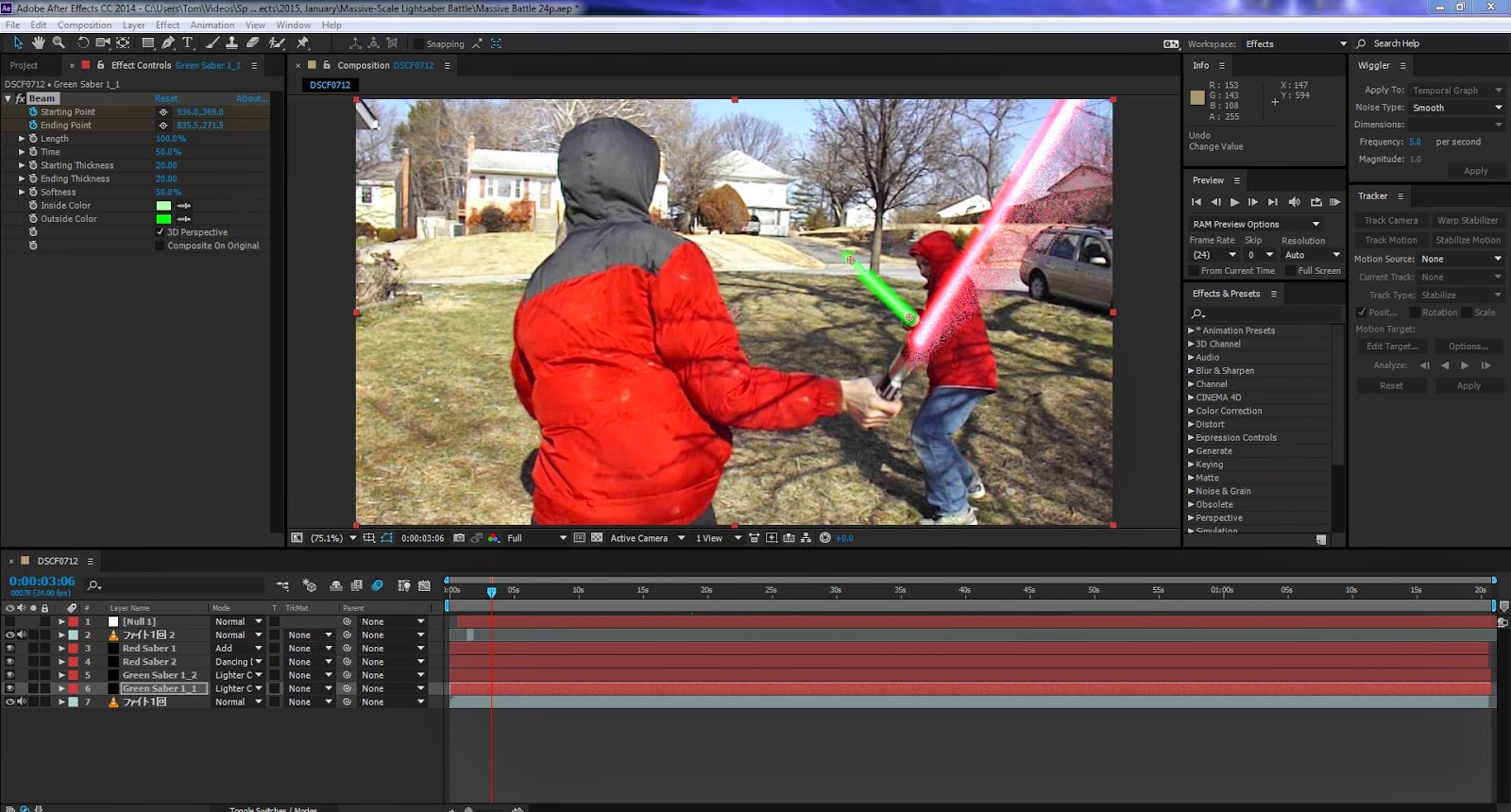
I've been in college for the last few months, so now I have a lot of catching up to do.  For now, though, I'll start with my relatively new video, Clash of the Jedi! Done with virtually no budget and an entire production team of two people, this was my most advanced project yet from After Effects.  I made the lightsabers by going to Effect --> Beam, although there are many more complicated ways to make them.  I got the fire effect from an excellent tutorial here , and the force jumps/knocking back were made by taking masks (in this case kind of like making selections) of the people and moving them.  I feel like this was my first "real" project, in the sense that it had music and multiple camera angles.  Hope to do more in the future!

At Last... After Effects!

Image
This is going to be a longer post than what I normally do, but don't worry, there's a movie.  Finally, after a while, I've learned much more on After Effects.  And now, I've finally decided to get started putting it on the blog... just as soon as my new college semester is starting.  Excuse me for a moment... *Whack!* Ahem.  After Effects, kind of like Photoshop for videos, is really pretty amazing.  Used on a huge amount of big-budget movies, I've done a lot with it, and I've recently learned that I've barely scratched the surface! Here's a screenshot of the basic area (while working on a yet uncompleted/test project):  There's a whole lot of stuff in this program, but in order to do anything with it, it's good to know about three really important things: 1. The Preview panel.  It's usually on the right side of the interface, but if it doesn't appear at all, you can bring it up by pressing Window-->Preview (if it's ch...